How to play glint.skin
glint.skin turns any picture into a 3D holo trading card. It’s free, it runs in your browser on a phone, tablet or computer, and there’s nothing to download and no account to make.
1. Open your first pack
The first time you open glint.skin you get ✦85 to start, and your first pack is waiting on the Today tab. Your first pack is always Rare or better.
- Choose a picture. Your avatar, your pet, your sneakers, your setup: anything works, and a screenshot of your avatar works well. On the website you can also tap Use my Roblox avatar and type a Roblox username, to bring in that avatar as it looks right now.
- Say what it is. Every card is an Avatar, a Pet or a Thing, and each type has its own three stats (below).
- Name it, then drag and zoom the picture until the card’s window shows what you want. The card gets exactly what you see.
- Open the pack. Tap it and watch the seams: the colour glowing through them is a hint. The card’s rarity, stats and title are decided as it opens.
| Type | Its three stats | Some of its titles |
|---|---|---|
| Avatar | Aura, Drip, Chaos | Certified Menace, Main Character, Lobby Legend, Drip Merchant |
| Pet | Zoomies, Snack theft, Loyalty | Snack Thief, Zoomies Champion, Couch Guardian, Professional Napper |
| Thing | Hype, Vibes, Mystery | Mint Condition, Limited Edition, Absolute Unit, Rare Find |
Any picture fits. A photo fills the card’s window, a tall screenshot or a square keeps all of itself on its own colours, and a cut-out (like a Roblox avatar render) stands on a lit backdrop with a soft shadow.
2. Read your card
- Rarity: Common, Rare, Epic, Legendary, Mythic or SECRET. The rarer the card, the higher its stats can roll. See Card rarities and odds.
- Three stats, named for the card’s type, each up to 99.
- Overall (OVR): the average of the three stats, on the shield in the picture’s corner.
- A title, like Snack Thief or Main Character, picked from the type’s list.
- Its level (LV) at the top, and a serial number at the foot.
Cards are drawn in real 3D. The holo foil shifts as the card tilts: on the Cards tab, drag a card to tilt it, tap it to pick it up and spin it round, and pinch or scroll to zoom.
3. A free pack every day
A new free pack is ready every day at midnight, your time. Bonus packs come from codes: every glint.skin Short ends with one, three a day, and the third code each day gives a bonus pack.
Your collection has 6 card slots to start with, and 6 more at a time, up to 48, for ✦100, ✦150, ✦200, ✦250, ✦300, ✦350 and then ✦400. When it’s full, the pack screen says which card will make room (the least levelled one) and offers more slots first.
4. Level your cards up
Spend shards to take a card from level 1 up to level 10. Every level adds 3 to each of its stats (up to 99), and the overall rises with them. At levels 3, 5, 7 and 10 the card changes how it looks, too.
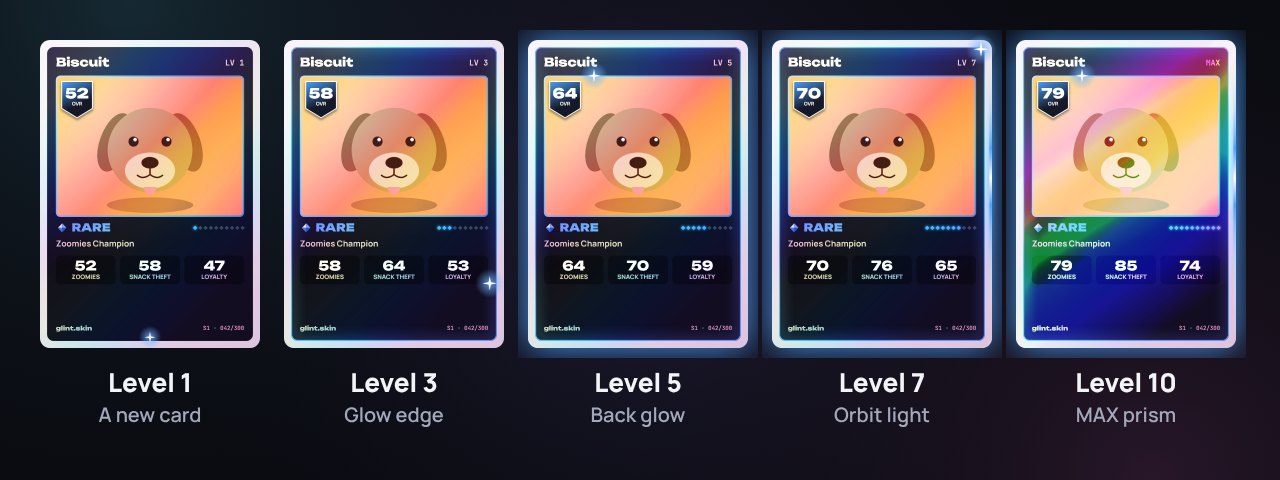
| Level | Shards to reach it | Added to each stat | What it gains |
|---|---|---|---|
| 1 | A new card | ||
| 2 | ✦40 | +3 | |
| 3 | ✦60 | +6 | Glow edge: its border glows in its rarity color |
| 4 | ✦90 | +9 | |
| 5 | ✦130 | +12 | Back glow: a light pulses behind the card |
| 6 | ✦180 | +15 | |
| 7 | ✦240 | +18 | Orbit light: a light runs round the frame |
| 8 | ✦310 | +21 | |
| 9 | ✦390 | +24 | |
| 10 | ✦480 | +27 | MAX prism: prism foil and a MAX badge |
Taking a card all the way to level 10 costs ✦1,920, and adds +27 to every stat. That’s why levels matter even on a Common: a levelled-up card can end up stronger than a brand-new card of a rarer kind. Before you spend, the level-up panel shows every stat now and after, and where the card will land on this week’s Top Cards.
5. Earn shards
Shards (✦) pay for levels, looks and card slots. Shards never buy packs, so nothing random is for sale. Every one of these is free:
- The daily gift: ✦10, ✦15, ✦20, ✦25, ✦35, ✦45, then ✦85 on day 7, for claiming on days in a row. Miss a day and the track starts again.
- Codes from the Shorts: type them into the box on Today. Each works once.
- Daily puzzles: two a day, up to ✦75 each. See Daily puzzles.
- Daily missions: four a day, ✦50 in all.
- Open a pack: ✦10
- Finish a daily puzzle: ✦10
- Share a card or a result: ✦15
- Play a Clash battle: ✦15
- Clash: your first 3 battles against friends each day pay ✦20 for a win, ✦15 for a draw and ✦10 for a loss. See Clash.
- Sharing: each way of sharing a card or a result pays once a day, up to ✦50 a day.
- Trophies: 17 of them, each paying once (below).
- Cloud save: ✦15, once, for turning it on.
Tap your shard balance at the top of the screen to see everything that’s waiting for you right now.
6. Trophies
| Trophy | For | Pays |
|---|---|---|
| First Pull | Open your first pack | ✦15 |
| Big Brain | Solve a daily puzzle | ✦15 |
| Show-off | Share a card or a result | ✦20 |
| Purple Reign | Pull an Epic or better | ✦25 |
| Gold Rush | Pull a Legendary or better | ✦50 |
| Myth Maker | Pull a Mythic or better | ✦100 |
| ??? | A secret, until it happens | ✦250 |
| Glow Up | Get a card to level 5 | ✦40 |
| Maxed Out | Get a card to level 10 | ✦125 |
| Sharp Eye | Guess a puzzle from its first clue 3 times | ✦35 |
| On a Roll | Play 3 days in a row | ✦25 |
| Week Streak | Play 7 days in a row | ✦70 |
| Collector | Have 10 cards | ✦50 |
| Drip Check | Own 5 cosmetics | ✦35 |
| First Win | Win a Clash against a friend | ✦35 |
| Giant Killer | Beat a friend whose card has a higher overall | ✦50 |
| Rivalries | Battle 3 different friends | ✦40 |
7. Dress your cards up
Every card can wear a foil, a frame, a background, a name style, an aura and stickers. Most are in the Shop, and you can try anything on your own card before you buy it. Some can’t be bought at all: they’re rewards for the days you play, whether or not they’re in a row. See Every look.
8. Your progress
There’s no account to make: your cards and progress are saved in the browser you play in. Settings → Save and backup can save them to a file and load them back, to move them to another browser. Cloud save (13 and over) keeps your progress and your cards’ pictures in a private account, and brings them back wherever you sign in.
Settings also has the sound, Reduce motion (less shaking and flashing), pop-ups, and whether you show on the leaderboards.